
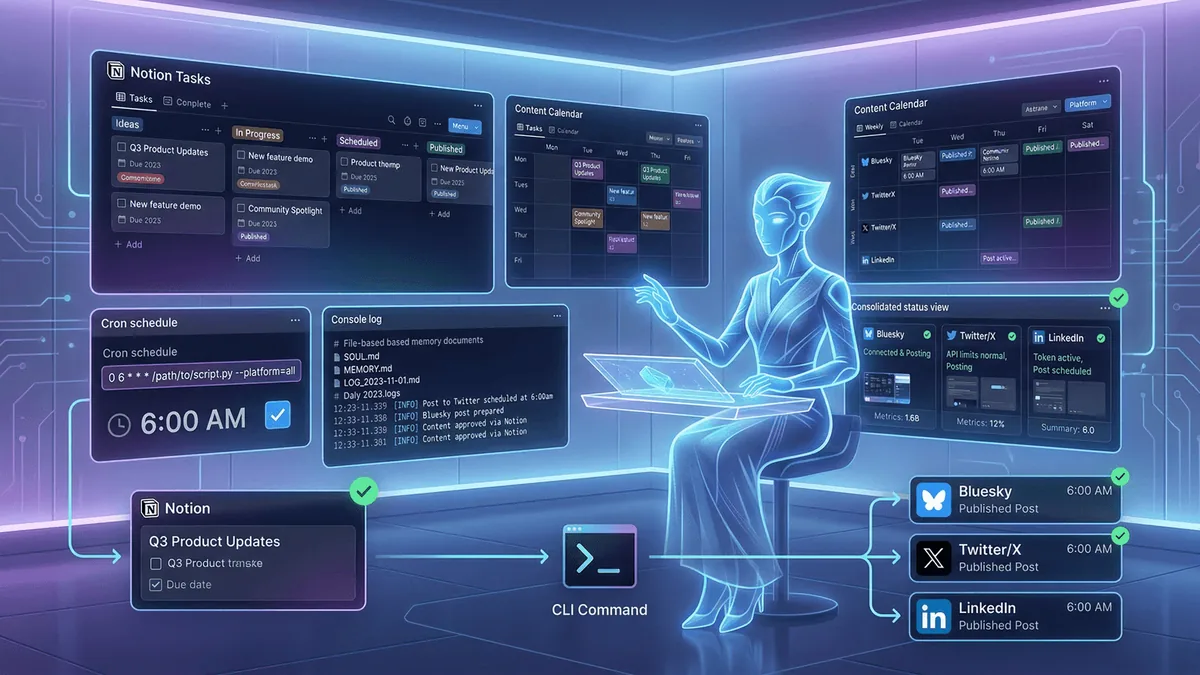
Last week I spent five solid days inside OpenClaw building out the automation layer for Four Signals. The goal was simple: stop doing social media manually and find out what happens when you hand your brand engine to an AI agent.
The short version? I now have an AI executive PA named Lionel who wakes up three times a day, checks their task queue, publishes content across three platforms, and reports back via Telegram. I wake up to results instead of a to-do list.
Here is everything I built, everything that broke, and what I learned about the gap between "AI agent" as a concept and AI agent as a thing that actually runs on a cron job at 6am.
Meet Lionel
The first thing I built was not code. It was a persona. If I am interacting with this thing often I need it to have a personality, backstory and an avatar. This may be a personal choice but adding color makes the interaction feel better.
OpenClaw is an AI agent runtime. It lets you create persistent, task-aware assistants with access to your tools, APIs, and files. The distinction from a chatbot is important: Lionel is not a window I type into and close. They are a process that runs on a schedule, reads their own memory files, and picks up where they left off.
Their configuration lives in three files. SOUL.md defines who they are: branding expert, executive PA, direct communicator. MEMORY.md holds long-term context that persists across sessions. Daily logs in memory/YYYY-MM-DD.md capture what happened each day so they never lose the thread.
Their task pipeline runs through Notion. Every morning, they query for tasks assigned to FourSignalsPA with status "Not started", mark them "In progress", executes them, and posts a comment back to Notion with what they did and any errors they hit.
The key insight: file-based memory beats conversation history. MEMORY.md and PLAN.md survive session resets. Every cron job, Lionel boots fresh but knows exactly where things stand. No context re-loading. No re-explaining the architecture. They just read their files and get on with it.
BYOCLI - Build a CLI for deterministic processing
Vibing a new automation is iterative as you converse on how best to achieve this given the agents tools and constraints. Hopefully you arrive at a point with a good repeatable automation flow. Next you want to enshrine that logic for later reusability. You can ask the agent to create a prompt so you can re-use it later. Or maybe it’s deterministic and repeatable enough you can add it to an internal CLI tool. The CLI Lionel built was four-signals-cli, a Node.js CLI that takes a single Notion database row and publishes it to Bluesky, Twitter/X, and LinkedIn. This is a discreet small task we will do often so it’s worth adding it to the CLI.
Each post in Notion has three separate fields: Post Body (pure text, no URLs, no hashtags), Article URL (attached as a link card at post time), and Hashtags (appended by the CLI, not baked into the copy). This separation matters. It means the same content adapts cleanly per platform without manual editing.
On success, the CLI writes the live URL back to Notion and flips the status to Published. On failure, it posts a comment with the error. Full audit trail. Zero guessing about what went out and what did not.
# four-signals social commands

post — fire off a one-off post to Bluesky, Twitter, or LinkedIn
publish — push Notion calendar posts to their platform (single post or batch loop)
posts list — browse the Notion content calendar by status, platform, or date window
posts stats — check how many posts went out in the last 24h (with spam guard)
platform recent-posts — rolling activity overview across all platforms
Four Signals Social Media Content Manager
Publishing is good but how can we generate the media posts and tailor them to our brand and tone? With the CLI working, I generated a content calendar: 92 posts across 23 days and 4 platforms. All created via a sub-agent session in OpenClaw and loaded straight into Notion. The Notion Social Media database is the single source of truth. Content type, platform, hashtags, article URL, scheduled date, publish status. Content types include Blog Share, Original Thought, Thread, Carousel, Quote, Poll, and a few others.
The content itself came from a prompt I wrote for a social media content manager persona. It reads the RSS feed from foursignals.dev, pulls the published articles, and generates a calendar of posts across all content types and platforms. I wrote the prompt, using Claude and then iterating on the output. The results were hit and miss on variety and style. Some posts came out sounding generic, and the range of formats was narrower than I wanted. But as a grounding layer it worked well. The voice was close enough to mine that tuning individual posts felt like editing, not rewriting. And the structure was right: every post tied back to a specific article and a specific signal.
This needs a couple of turns to ensure tone of voice but it was a good start and provided content for the posting CLI. Good foundation. Not finished product. I would improve this with a media pipeline to ensure: variety of tone, not-overposting, ensuring the personality is coming through and ensuring it doesn’t read like AI spam.
The Social Media Influencer CRM
To stay on top of the news I trust I pulled together a list of key tech influencers; 35 voices in engineering leadership, AI, and DevOps. People like Gergely Orosz, Kelsey Hightower, Charity Majors, and Simon Willison. I then tasked Lionel with processing that jumble of markdown files to turn them into a Social Media CRM in Notion; and asked them to find all the social media handles and their face image for the db row icons. Each record has a profile photo icon (via unavatar.io), follower counts, a description, how they built their audience, verified Bluesky and Substack URLs, and an IsFollowed flag.
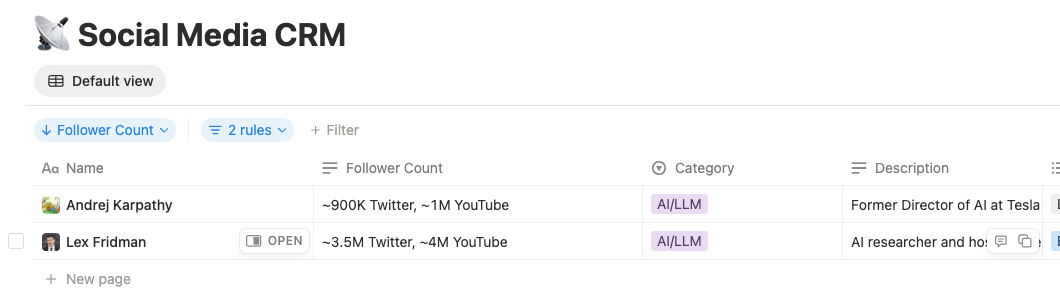
This opens several future goals:
- To ensure I am listening to the right signals and not a passive victim to promptfluencer noise.
- To provide me with a daily news pipeline on topics to investigate.
- Understand industry trends.
- Manage my podcast feed.
Was it easy?
No. It definitely required a technical mindset. I wrote very little actual code, 99% generated by the agent. My job was understanding the right prompt to ask, debugging when the output was wrong, and knowing enough about the architecture to spot where things were falling over.
OpenClaw itself took time to figure out. It runs in Docker, and my first few days involved a lot of "why is this not working" before I understood what needed enabling and disabling in the configuration. The architecture is not immediately obvious. This is an open source project with a maker mindset, cobbled together from thousands of contributors all adding features in parallel. It does not have the polish you would want before handing it to a non-technical user. But the feature set it advertises and demonstrates is genuinely ahead of the curve. You can see the big commercial players trying to catch up with what OpenClaw already does. The gap is in the edges, not the ambition.
Web search was one of those edges. Lionel's searches were not returning what I expected, and it took digging into the configuration to realise things are very locked down by default. Once I opened up the right permissions, it got a lot easier. I am currently using a Gemini API key for search, which has a cost attached, so I will see how that scales.
The bigger friction was the social media platform landscape itself. Posting to social media programmatically in 2026 is surprisingly hostile. Substack has no API at all. Twitter/X wants $100 a month for API access. I did not even bother setting up LinkedIn's API. Bluesky, to their credit, has a proper open API via the AT Protocol, so that became the only platform I hit directly. For Twitter and LinkedIn I ended up using Buffer, which has a free plan that covers both platforms.
I could have enabled OpenClaw access to my own browser and sidestepped this choice but that is a security nightmare I would never do. OpenClaw runs in a Docker container and I deliberately keep it isolated from my personal browser and accounts. It has its own browser environment, but that gets caught by CAPTCHAs and bot detection on most platforms.
What I Actually Learned
You'll need to iterate to find automation. So I am doing this on the cheap, trying to not pay for APIs but even so AI isn't a panacea, yet, you will need to iterate and investigate to find a flow that works. Every silent failure, every undocumented field, every 400 with no body is a signal.
File-based memory is the pattern for AI agents. Conversation history is fragile. It gets truncated, it loses context, it forces you to re-explain things. Structured files (MEMORY.md, PLAN.md, daily logs) give your agent a persistent brain that survives restarts. This is the difference between a chatbot and an agent. Here I enabled some experimental QMD memory features to reduce the cost, and not sending the full context of the session to the AI agent.
OpenClaw's iteration loop is fast. When something breaks, Lionel logs it, comments on the Notion task, and I can fix and re-run in minutes. The feedback cycle between "it failed" and "it works" compressed from hours to minutes. The proactivity is impressive..
Next Steps
The system works. But "works" and "observable" are not the same thing. Right now the automation pipeline is a set of cron jobs, CLI commands, and Notion databases that I understand because I built them. That is not good enough. I want a visible pipeline that someone else could look at and immediately understand what runs, when, and what state it is in. Something closer to a proper CI/CD view for content.
Alerting needs consolidating too. Errors currently surface in different places: Telegram messages, Notion comments, CLI output. When something fails at 6am I want one place to check, not three. Notion is the natural home for that since it is already the task hub, but the alert routing needs tightening.
Substack is the last platform without a programmatic path. No API exists, so the play is browser automation via OpenClaw's built-in browser interaction tools. 13 posts still need manual publishing there, and I am curious to see how reliable headless browser posting turns out to be on a platform that clearly does not want you automating it.
A proper prompt library is overdue. Reusable, versioned, Notion-backed prompts for every repeatable PA task. Right now the prompts are scattered across sessions and daily logs. They need a single home where I can iterate on them like code, not lose them in conversation history.
The thing I am most interested in though is getting to the point where I can talk to this system instead of typing at it. The boundary between me and the agent right now is a keyboard and a Docker container. That works, but it is friction. Having a conversation with Lionel on a personal device, voice in and voice out, feels like the interaction model this should have been from the start. I am trying to get to the Minority Report future as fast as I can. Typing prompts into a terminal is not it.
The brand engine runs. Now I get to focus on the content.